About application delivery
Publish release artifacts
Releases should be made available in multiple formats to support different installation methods and customer environments. For example, while some enterprise customers with Kubernetes expertise will prefer to install in their own cluster, others will prefer to install on a virtual machine (VM) or bare metal server. Additionally, enterprises with an emphasis on security might need to deploy software in air gap environments with no outbound internet access.
Allow enterprise customers to choose the release asset they need based on their unique preferences and requirements. For example, a vendor might need to publish all of the following for a single release: Raw artifacts, such as Helm charts or containers Downloadable archives that contain the release images for air gap installations Installation scripts, such as scripts that install the application in Kubernetes clusters or on VMs Release assets that are specific to the operating system, such as unique assets for installations in Linux or Windows environments Additionally, all release artifacts should be cryptographically signed so that enterprise customers can verify the authenticity and integrity of the software before installing. Tools such as Sigstore Cosign can be used to sign and verify release artifacts automatically as part of a CI/CD pipeline.
Supply chain metadata per-release
With the Enterprise Portal Security Center, you can include supply chain metadata for each release, offering demonstrable proof that their software supply chain is secure, compliant, and traceable. For example:
- SBOMs
- Provenance attestations which include verifiable information about where, when, and how the software was produced
- The Supply-chain Levels for Software Artifacts (SLSA) security level, which is based on industry consensus security guidelines and communicates the integrity guarantees of the software
- Results of vulnerability scans to show that the software meets enterprise security and compliance requirements
About the customer-facing Enterprise Portal
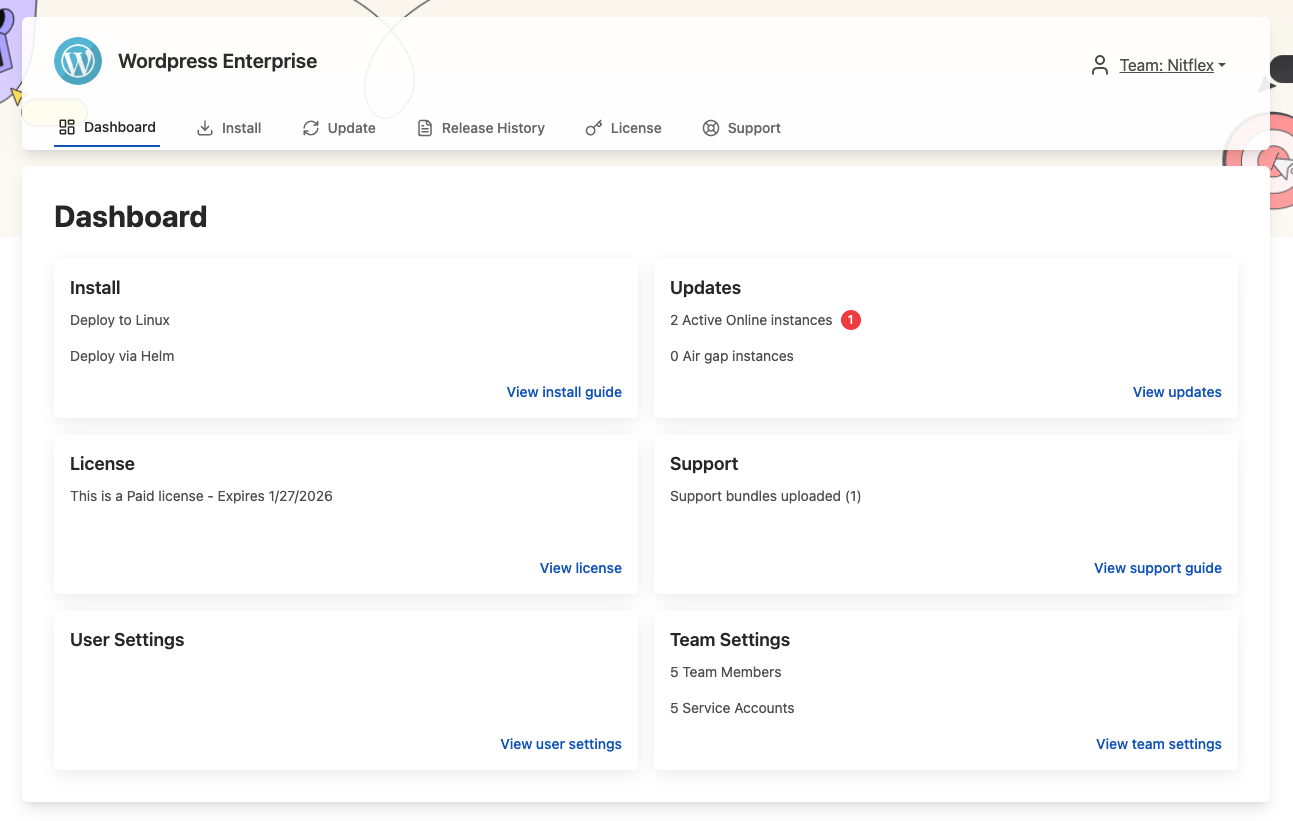
The Enterprise Portal is a customizable, web-based portal for customers that install using either Replicated Embedded Cluster or the Helm CLI.
From the Enterprise Portal, your customers can:
- View application install and update instructions for Embedded Cluster and Helm CLI installations
- Manage their team members and service accounts
- Upload support bundles
- View insights about their active and inactive instances
- And more
The following shows an example of the Enterprise Portal dashboard:
View a larger version of this image
Enterprise Portal access
Your customers can access the Enterprise Portal outside their application installation environment at a custom domain that you specify, making it easier for teams to manage instances and get support.
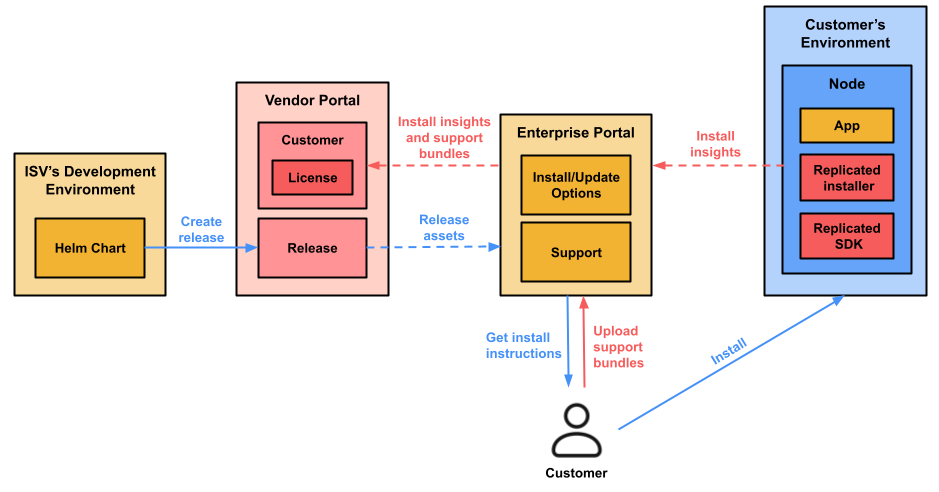
The following diagram shows how customers can use the Enterprise Portal to access release assets and installation instructions, as well as upload support bundles:
View a larger version of this image
As shown in the diagram above, your licensed customers can access the installation and update instructions for one or more application releases by logging in to the Enterprise Portal. The Enterprise Portal tracks the customer's installation attempts and progress, and shares those insights back to the Vendor Portal. After installing, customers can also upload support bundles in the Enterprise Portal. Support bundles uploaded to the Enterprise Portal are automatically made available to you in the Vendor Portal.
For information about using the Enterprise Portal, see Access and Use the Enterprise Portal.
Preflight Checks
In addition to thorough installation instructions, the best vendors also provide preflight checks that customers can run to validate if the resources provided meet the hardware, network, and environment requirements for the software before proceeding with installation. These types of checks can help increase the success rate of installations and upgrades, reducing customer frustration and speeding up the time-to-value for the application.
GUI-Based Experience
Providing an installation GUI can also make it easier for less advanced customers to complete installation tasks, such as providing their license or configuring the deployment, without needing to interact with the command line or edit complex YAML files. This can improve the customer experience and cut down on installation errors, helping to reduce the number of support issues related to installation.